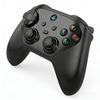
・【Hall Effect Stick/Switch2 Sleep Wake-Up Support】This gamepad features a highly precise 2200-stage Hall effect stick. The non-contact sensor fundamentally eliminates stick drift and achieves exceptional durability. The stick sensitivity can also be adjusted in three levels: “Low/Medium/High.” It supports Switch 2 sleep wake-up. Please refer to the video on this page for pairing instructions. (※Please update to the latest firmware from the official website before use. Also, upgrade your Switch 2 to system version 20.3.0 or higher.)
・【TURBO Automatic Burst Function & Macro Function】This Switch controller supports AUTO full-automatic burst and TURBO semi-automatic burst. In addition to the semi-automatic burst mode, where the burst continues only while the button is held, it also allows you to set “Burst Hold,” which maintains the burst state even without holding the button. You can switch according to your play style, comfortably supporting fast operation in shooting and action games. Furthermore, it is equipped with a macro function that can record up to 10 minutes of stick operation and button inputs. Simply press the dedicated “Learning Button” located intuitively in the center of the controller to reproduce the recorded actions, easily executing complex operations and combo attacks.
・【Adjustable Vibration & Gyro Sensor】In addition to HD vibration, it features GuliKit’s uniquely developed “Super Tactile Mode” and a conventional rotary mode. Each mode can be adjusted in three levels: Weak, Medium, and Strong, allowing you to enjoy a total of 9 types of delicate vibration expressions. It is also equipped with a high-sensitivity 6-axis motion sensor that quickly detects even slight tilts and angle changes of the controller, enabling intuitive operation.
・【A-B/X-Y Button Customization & 4/8-Directional D-Pad】The GuliKit controller supports customization of the A-B/X-Y buttons. You can easily switch between different button layouts for Switch and PC games directly on the controller itself. Additionally, the D-pad can be set to 4 or 8 directions, completely eliminating the problem of misinputs that often occur with conventional D-pads. This achieves accurate and comfortable operation.
・【Wide Compatibility & Up to 20 Hours of Continuous Use】This wireless controller can be used on various platforms such as Switch/Switch2, PC, Android, and IOS. It supports both wireless and wired connections, allowing you to enjoy games comfortably in any environment. It is equipped with a large-capacity 800mAh battery, providing up to 20 hours of continuous use.
・【Ultra-Lightweight at 180g & Includes Protective Case】The main unit weighs only 180g, making it lightweight and comfortable to use for extended periods. It features a retro design with a grip opening of 125 degrees, bringing the sticks closer to your fingers for easy operation. The L and R buttons have a press feel that is neither too light nor too heavy, fitting a wide range of games. A protective case is included in the packaging for convenient portability.
・【PC Customization Support】Controller customization settings are available on the GuliKit official website. Please try the following steps: Access the GuliKit official website, then update the firmware for the Eves 2 Pro controller from 【Download】. Then, connect the controller on the 【Setup Tool】page and customize the gamepad settings to your liking.
・【Switch 2 Sleep Wake-Up Procedure】(Please update to the latest firmware before use.) The Elves 2 Pro controller supports the Switch 2 sleep wake-up function. The method for using the sleep wake-up function is as follows: ①Set the controller to NS mode, turn it on, and press and hold the pairing button until the indicator flashes rapidly, entering pairing mode. ②On the Switch 2 console, select “Controllers” → “Change Grip/Order” and complete the pairing. ③Once pairing is complete on the Switch 2, remove one Joy-Con once, wait for it to reconnect, and then reattach it to complete the special pairing. (Pairing using the normal method will complete the pairing, but the Switch 2 sleep wake-up function will not be supported.) Also, upgrade your Switch 2 to system version 20.3.0 or higher.
【Voltage Compatibility】
When using electrical appliances, please note that they are designed for Japanese voltage specifications (90-110V), so if you use them with a different voltage, it may cause a malfunction.
【Plug Type】
Our products use Japanese plug types (A or B type).
Please use a conversion adapter if necessary.
【Important Note on Transformers and Adapters】
A transformer adjusts voltage to match your device's requirements.
A conversion adapter only changes the plug shape and does not adjust voltage.
Using only a conversion adapter without a transformer may result in damage to the product.
【Liability】
We are not responsible for malfunctions or damages caused by improper use, such as operating the product without a transformer.
![GuliKit Elves 2 Pro Controller [Switch 2 Wake-Up] Wired/Wireless, Hall Effect Sticks, Anti-Drift, Auto/Semi-Auto Fire, 6-Axis Gyro,](https://img.joomcdn.net/9052bc7fae0f143828f51530084dd9a08bf9aba9_original.jpeg)
![GuliKit Elves 2 Pro Controller [Switch 2 Wake-Up] Wired/Wireless, Hall Effect Sticks, Anti-Drift, Auto/Semi-Auto Fire, 6-Axis Gyro,](https://img.joomcdn.net/664138c997bfc0085cc7496769e2b945ee216754_original.jpeg)
![GuliKit Elves 2 Pro Controller [Switch 2 Wake-Up] Wired/Wireless, Hall Effect Sticks, Anti-Drift, Auto/Semi-Auto Fire, 6-Axis Gyro,](https://img.joomcdn.net/35e1b47e1ad7a321984d08b726002e863e2781f6_original.jpeg)
![GuliKit Elves 2 Pro Controller [Switch 2 Wake-Up] Wired/Wireless, Hall Effect Sticks, Anti-Drift, Auto/Semi-Auto Fire, 6-Axis Gyro,](https://img.joomcdn.net/099387acc8d8df5a40ec6e8fc6965f36f1e9f4a6_original.jpeg)
![GuliKit Elves 2 Pro Controller [Switch 2 Wake-Up] Wired/Wireless, Hall Effect Sticks, Anti-Drift, Auto/Semi-Auto Fire, 6-Axis Gyro,](https://img.joomcdn.net/01d22ae6846a4a4178d864ddb7a11e848b919492_original.jpeg)
![GuliKit Elves 2 Pro Controller [Switch 2 Wake-Up] Wired/Wireless, Hall Effect Sticks, Anti-Drift, Auto/Semi-Auto Fire, 6-Axis Gyro,](https://img.joomcdn.net/f037133c38262c7a05e398511519d3af2be19a33_original.jpeg)
![GuliKit Elves 2 Pro Controller [Switch 2 Wake-Up] Wired/Wireless, Hall Effect Sticks, Anti-Drift, Auto/Semi-Auto Fire, 6-Axis Gyro,](https://img.joomcdn.net/b0f85618ca822c228a2949b8ed74b81041b9a77c_original.jpeg)
![GuliKit Elves 2 Pro Controller [Switch 2 Wake-Up] Wired/Wireless, Hall Effect Sticks, Anti-Drift, Auto/Semi-Auto Fire, 6-Axis Gyro,](https://img.joomcdn.net/dc7b059911fc39e03844e7ce209fb24313d3b1cd_original.jpeg)


 No-delivery refund


![Aclass Turbo EX Wireless Controller for Switch Fire 2/Switch/PC [Lightweight/Back Buttons/Button Assignment/Rapid Hold] (Black)](https://img.joomcdn.net/9f0fb1c5b032baecadf5ce8652c6af0584cc282e_100_100.jpeg)


![GuliKit ES Pro Wireless/Wired Controller [Competitive Speed] TMR Sticks, Drift Prevention, Switch/Switch 2 Sleep Wake, Turbo Auto-Fire, 6-Axis Gyro, A](https://img.joomcdn.net/db3984b5dc75dbbb70b9055747ca28f252b1cf79_100_100.jpeg)



![Wireless Bluetooth Gamepad for Nintendo Switch Pro Console Controller Joystick 6-Axis for NS [2B3D6E0]](https://img.joomcdn.net/d92afca4c3adab9f7b1e217b238726f8cdb6b63a_100_100.jpeg)