----------------------------------------------------------------------
【Voltage Compatibility】
When using electrical appliances, please note that they are designed for Japanese voltage specifications (90-110V), so if you use them with a different voltage, it may cause a malfunction.
【Plug Type】
Our products use Japanese plug types (A or B type).
Please use a conversion adapter if necessary.
【Important Note on Transformers and Adapters】
A transformer adjusts voltage to match your device’s requirements.
A conversion adapter only changes the plug shape and does not adjust voltage.
Using only a conversion adapter without a transformer may result in damage to the product.
【Liability】
We are not responsible for malfunctions or damages caused by improper use, such as operating the product without a transformer.
Kindly confirm these details before placing your order.
----------------------------------------------------------------------
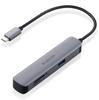
A docking station equipped with a USB Type-C (TM) port that supports USB 5Gbps (USB3.2 (Gen1)). Compatible with USB Power Delivery, which can supply power to notebook computers, you can connect all necessary peripheral devices to a computer equipped with a USB Type-C (TM) connector with a single cable.
You can connect all the necessary peripherals to a computer equipped with a USB Type-C(TM) connector with a single cable.
The connection to the computer is compatible with USB 5Gbps (USB3.2 (Gen1)), which achieves ultra-high speed data transfer of up to 5Gbps (theoretical value).
Equipped with one USB Type-C (TM) port that supports USB 5Gbps (USB3.2 (Gen1)).
*For data communication only, does not support video output.
【 specification 】
■Supported OS (Windows): Windows 11/Windows 10
■Supported OS (mac): macOS Sonoma 14/macOS Ventura 13/macOS Monterey 12
■Supported OS (iPadOS): iPadOS 17/iPadOS 16
■Supported OS Notes: *You may need to update to the latest version of each OS or install a service pack.
■Connector specifications (upstream): USB Type-C (TM) connector <USB 5Gbps (USB3.2 (Gen1))>, USB Power Delivery compatible (maximum input 100W / maximum output 85W), DisplayPort (TM) Alt mode (operates with USB 2.0 compatibility when connected with USB 2.0 (video output not supported when USB 2.0 is connected)
■USB port (downstream): 1: USB Type-C (TM) port <USB 5Gbps (USB3.2 (Gen1))> x 1, power supply value: 7.5W (5V/1.5A) *For data communication only, does not support video output.
■USB ports (downstream): 2: USB Type-C (TM) port x 1 <Maximum output 100W> *USB Power Delivery port for charging only
■USB ports (downstream): 3: USB-A port <USB 5Gbps (USB3.2Gen1))> x 2, 2 ports total: 7.5W (5V/1.5A)
■USB port (downstream): *This product is for adding more USB ports. We do not recommend using this product to charge smartphones or tablets.
■Video output port (downstream): HDMI x 1 <Supported resolution: up to 4K/30Hz>
■Power supply method: bus power
■Cable length: Approximately 15cm *Does not include connector
■Color: Black
■External dimensions: Product body: Width approx. 122mm x Depth approx. 41mm x Height approx. 10mm *Cable not included
■Operating environment: Temperature 5-40℃, humidity 30-80% *No condensation
■Warranty period: 1 year
【 explanation 】
■A docking station that connects to a computer with a USB Type-C (TM) connector and allows you to connect USB devices and HDMI displays.
■You can connect all the necessary peripherals to a computer equipped with a USB Type-C(TM) connector with a single cable.
■Compatible with USB Power Delivery, which supplies up to 100W (*) of power to the device/computer via the USB Type-C (TM) connector.
■※The product itself consumes 15W, so the actual output is maximum 85W.
■※If you need 85W power supply, please prepare a charger with 100W output.
■By connecting a USB Type-C (TM) power adapter, you can charge your computer via this product.
■Equipped with 2 USB-A ports that support USB 5Gbps (USB3.2 (Gen1)).
■※This product is for adding more USB ports. We do not recommend using this product to charge smartphones or tablets.
■Equipped with an HDMI port (compatible resolution: up to 4K/30Hz) that allows video output from your computer to an external monitor.
■※When outputting video with this product, please make sure that the device supports DisplayPort(TM) Alt mode.
■※If the main unit does not support charging from the USB Type-C (TM) connector, the main unit cannot be charged via the USB Type-C (TM) connector of this product. When charging, please make sure your device supports USB Power Delivery.
■※This product does not operate on the system screen or BIOS screen before the OS starts.
■※Please connect this product directly to the USB Type-C(TM) connector on the computer. This product cannot be used if connected to the USB Type-C(TM) connector of a USB hub or expansion board.
■※USB Type-C and USB-C are trademarks of USB Implementers Forum






![ELECOM USB Hub 4 Port Bus Power Compact and Lightweight and Other Laptops Compatible with Nintendo Switch Black 3.0 [Ultra Design] MacBook/Surface](https://img.joomcdn.net/a660fd160e8f15384b3586cb37a1e3b4d6ddfbf2_100_100.jpeg)
![ELECOM Docking Station C Hub PD Compatible 1 1 30cm Cable Black Type-C [Charging Type-C1 Port/USB (3.0) Port/DVI Port/LAN Port] DST-C11BK](https://img.joomcdn.net/4b6300b188de7097a5826536c31e2ddbaa447f5b_100_100.jpeg)