【Voltage Compatibility】
When using electrical appliances, please note that they are designed for Japanese voltage specifications (90-110V), so if you use them with a different voltage, it may cause a malfunction.
【Plug Type】
Our products use Japanese plug types (A or B type).
Please use a conversion adapter if necessary.
【Important Note on Transformers and Adapters】
A transformer adjusts voltage to match your device’s requirements.
A conversion adapter only changes the plug shape and does not adjust voltage.
Using only a conversion adapter without a transformer may result in damage to the product.
【Liability】
We are not responsible for malfunctions or damages caused by improper use, such as operating the product without a transformer.
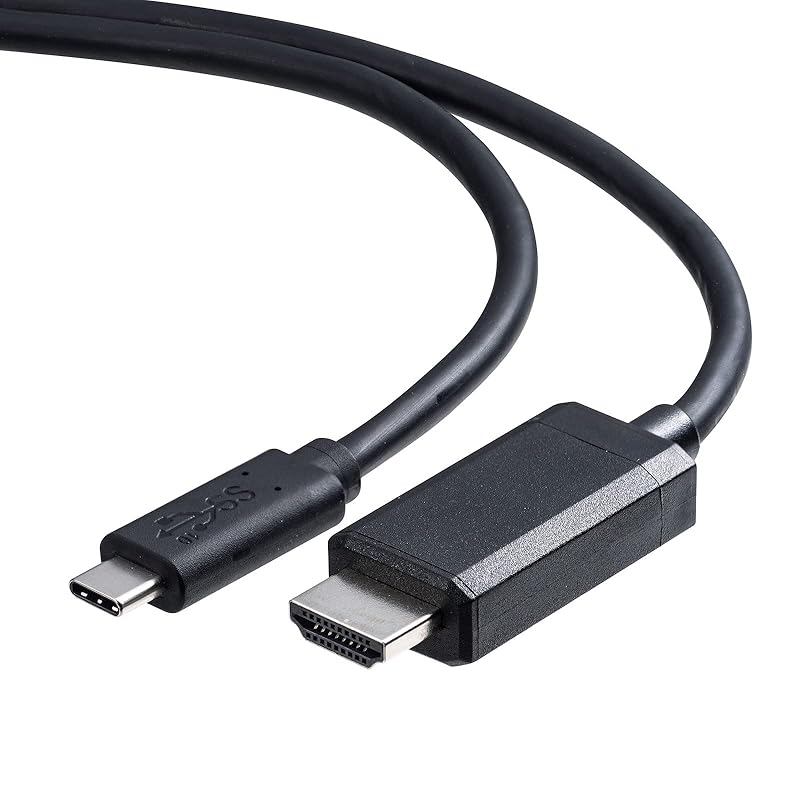
A conversion adapter cable for directly connecting a TV, display monitor, projector, etc. with an HDMI input terminal to a computer with a USB Type-C port that supports DisplayPort Alt mode.
You can convert a USB Type-C port that supports DisplayPort Alt mode to HDMI and output video and audio to an LCD TV, display, projector, etc. that has an HDMI input terminal.*Conversion from HDMI to USB Type-C (such as projecting images from an HDMI-equipped computer onto a USB Type-C display) is not possible.
If the device supports 4K output, you can output high-definition 4K content to a large-screen LCD TV or display that supports 4K.Supports maximum resolution 4K/60Hz.*An environment where the main unit, display, cable, etc. all support 4K/60Hz is required.
No driver required, just plug in the cable and it's easy to use.
You can extend or duplicate (mirror) your computer screen onto a large screen display or projector.



![ELECOM Usb C Conversion Cable 5m Type-C To HDMI 4K(3840×2160px)/60Hz Multi Display Mirroring [iPhone MacBook iPad Android Etc.] Black 16 Series](https://img.joomcdn.net/014601807e85f003d27ca3b6144d61c872dddc29_100_100.jpeg)

![ELECOM Usb C Conversion Cable 1m Type-C To HDMI Soft 4K(3840×2160px)/60Hz Multi Display Mirroring [iPhone MacBook iPad Android Etc.] Black](https://img.joomcdn.net/4e5312b5245dfa5f39b904ef643fae000bcb22ea_100_100.jpeg)
![Elecom Conversion Cable USBC DisplayPort Black Compatibility with iPhone Pro 2.0m [Verified 16/16 Pro/16 Max/16 Plus] CAC-CDP20BK](https://img.joomcdn.net/d1407dae30f63b5b58905f1a99f5dd95b751ab81_100_100.jpeg)

![Elecom HDMI Conversion Cable C To Conversion Cable Black Compatibility with iPhone Pro USB-C (USB HDMI) 5.0m [Verified 16/16 Pro/16 Max/16 Plus]](https://img.joomcdn.net/6f2ccfa8c7d7c2d7ed98857463ae0a3a2d06ad26_100_100.jpeg)
![ELECOM Usb C Conversion Cable 1m Type-C To HDMI 4K(3840×2160px)/60Hz Multi Display Mirroring [iPhone MacBook iPad Android Etc.] Black 16 Series](https://img.joomcdn.net/d79f1559c00f3de12eb65b284183cde00f0b56ad_100_100.jpeg)

![Elecom HDMI Conversion Cable C To Conversion Cable Black Compatibility with iPhone Pro USB-C (USB HDMI) 3.0m [Verified 16/16 Pro/16 Max/16 Plus]](https://img.joomcdn.net/e03481df7a8a6152fd89a654ed42f5401cd9bc1b_100_100.jpeg)

![ELECOM Usb C Conversion Cable 1m Type-C To HDMI 4K(3840×2160px)/60Hz Multi Display Mirroring [iPhone MacBook iPad Android Etc.] Black MPA-CHDMI10BK2](https://img.joomcdn.net/371ff51dead7deea9d4f6ab5687050dc6db00657_100_100.jpeg)
![Elecom Conversion Cable USBC DisplayPort Black Compatible with iPhone Pro 1.0m [verified 16/16 Pro/16 Max/16 Plus] CAC-CDP10BK](https://img.joomcdn.net/44f88f5d6619d6c93b20c9a945f150d3c8d658e0_100_100.jpeg)
![ELECOM Usb C Conversion Cable 2m Type-C To HDMI 4K(3840×2160px)/60Hz High Durability Multi Display Mirroring [iPhone MacBook iPad Android Etc.] Black](https://img.joomcdn.net/e0c7ffccfc5812543cde0fd51b61aca85ddf671c_100_100.jpeg)